
Cookieless Analytics
Cookieless Analytics is a free, open source, self-hosted analytics tool that runs as a plugin on EmDash CMS and measures any website.
EmDash sites get it as a plugin.
Every other site (plain Astro, static, any CMS) is measured with one script tag, and all reports live in one EmDash admin.
Cookieless Analytics counts visits without cookies and without writing anything to the visitor's device.
And it still reports real sessions: entry and exit pages, pages per session, bounce rate, duration and first-touch source.
The tracking script is about 2.7 KB gzipped, the data stays in your own database and the license is Apache-2.0.
View on GitHubInstall from npm
Starting a new site? The Deploy to Cloudflare button sets everything up in one click.
Adding it to an existing EmDash site? The install steps are further down.
What Cookieless Analytics Means (and What It Doesn't)
Cookieless analytics is web analytics that stores nothing on the visitor's device.
No cookie, no localStorage, no sessionStorage, no IndexedDB.
But the tool still has to know which page views belong to the same visit.
So the real question is: what replaces the cookie?
There are three common answers:
- Fingerprinting: rebuild an identifier from browser traits. That's just tracking with a new name.
- Log analysis: count requests on the server. You get hits, not visits.
- A salted hash that changes every day: group requests into visits without keeping anything that identifies a person across days.
Cookieless Analytics uses the third one.
How Cookieless Analytics Counts Visitors Without Cookies
For every request, the server builds a visitor key.
It's an HMAC-SHA256 hash of:
- the site
- the shortened IP address
- the browser family and major version
- the operating system family
- the device class
The hash is mixed with a random salt.
Before hashing, the IP is cut to /24 for IPv4 and /48 for IPv6.
The raw IP address and the full user agent are never stored.
Why the Daily Salt Matters
The salt is 32 random bytes and Cookieless Analytics creates a new one every day.
Salts older than two days are deleted.
A deleted salt can't be recomputed, so yesterday's keys can't be matched to anyone anymore.
That has a price, and I chose it on purpose:
Visitors are counted per day. There are no cross-day returning visitor numbers.
A figure over several days is the sum of daily visitors, and the reports label it that way.
How Cookieless Analytics Keeps Sessions Across Page Loads
Counting page views without a cookie is easy.
Keeping a visit together across page loads is the hard part.
Cookieless Analytics keeps sessions without a cookie, and this is the part I cared about most.
The tracking script holds a random session ID in a JavaScript variable that dies with the page.
- Navigation without a document load (Astro's ClientRouter, for example) keeps the ID.
- A full page load creates a new ID, and the server joins it to the running visit through the daily visitor key.
- A visit ends after 30 minutes without activity. You can set anything from 1 to 240 minutes.
The source and campaign come from the first page only.
So a later referrer doesn't split the visit in two.
There are limits, and the documentation states them openly:
- If a visitor changes network or browser mid-visit, the next full page load starts a new session.
- Two people behind one shared network address, with the same browser and device type, can merge into one session.
Cookieless Analytics vs Plausible, Fathom and Matomo
The core method isn't new.
- Plausible: hashes the IP address and user agent with a salt that is deleted every 24 hours.
- Fathom: hashes them with a daily salt that rotates at midnight UTC.
- Matomo: its cookieless mode groups actions into visits with a hashed config ID for up to 24 hours.
Cookieless Analytics belongs to the same family.
What's different is where it lives and what sits next to the numbers:
- Inside your CMS. The reports are part of the EmDash admin. There's no extra service to run.
- In your own database. The data stays in D1, a D1 database of its own or Postgres through Hyperdrive on your own Cloudflare account.
- Free. No subscription, Apache-2.0.
- Search data next to traffic. Google Search Console and Bing Webmaster Tools in the same interface.
- Any site. One script tag measures sites that aren't EmDash.
What you give up: heatmaps, session replay and user profiles. More on that below.
Does Cookieless Analytics Need a Cookie Banner?
Cookieless Analytics is designed to need no cookie banner.
Nothing is written to the device and no personal data is kept.
Whether that holds for your site depends on your country, your other tools and how you use the data.
This describes the technical setup. It's not legal advice. Ask a qualified person about your own case.
What I can show you is exactly what's stored.
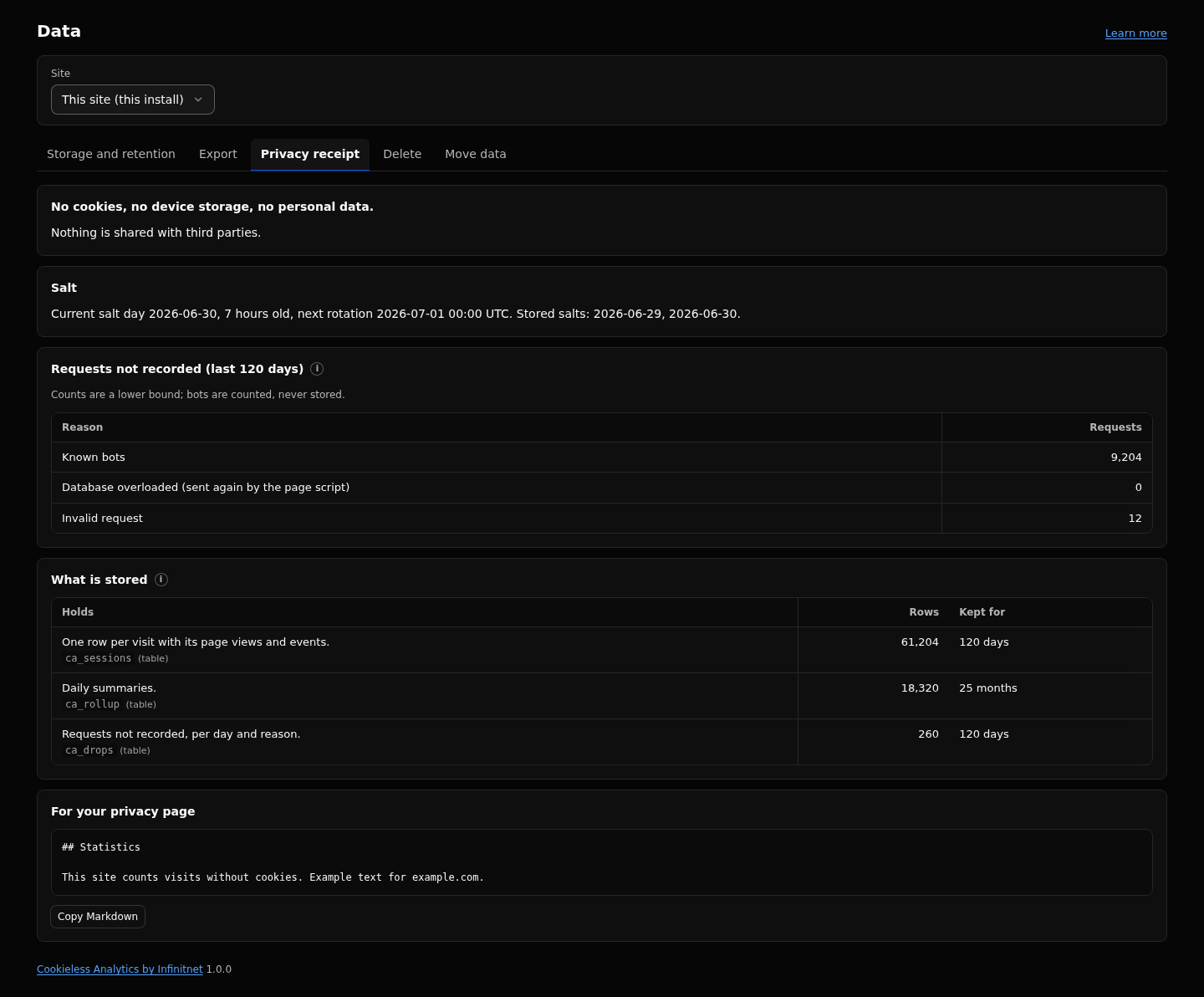
The Data page has a privacy receipt that lists:
- every table and column, with a plain description
- how long each one is kept
- the age of the current salt and the next rotation
- how many requests were dropped, by reason
- a block of Markdown you can paste into your own privacy page
How Cookieless Analytics Handles GPC, Do Not Track and Bots
Cookieless Analytics honors Global Privacy Control by default.
A visitor who sends it isn't counted, and the tracking script does nothing at all for them.
You can add Do Not Track in the settings.
Known bots get an empty 204 response and no row of any kind.
Reports, Search Console Data and Revenue in Cookieless Analytics
Counting visits is the easy part. Here's what else you get:
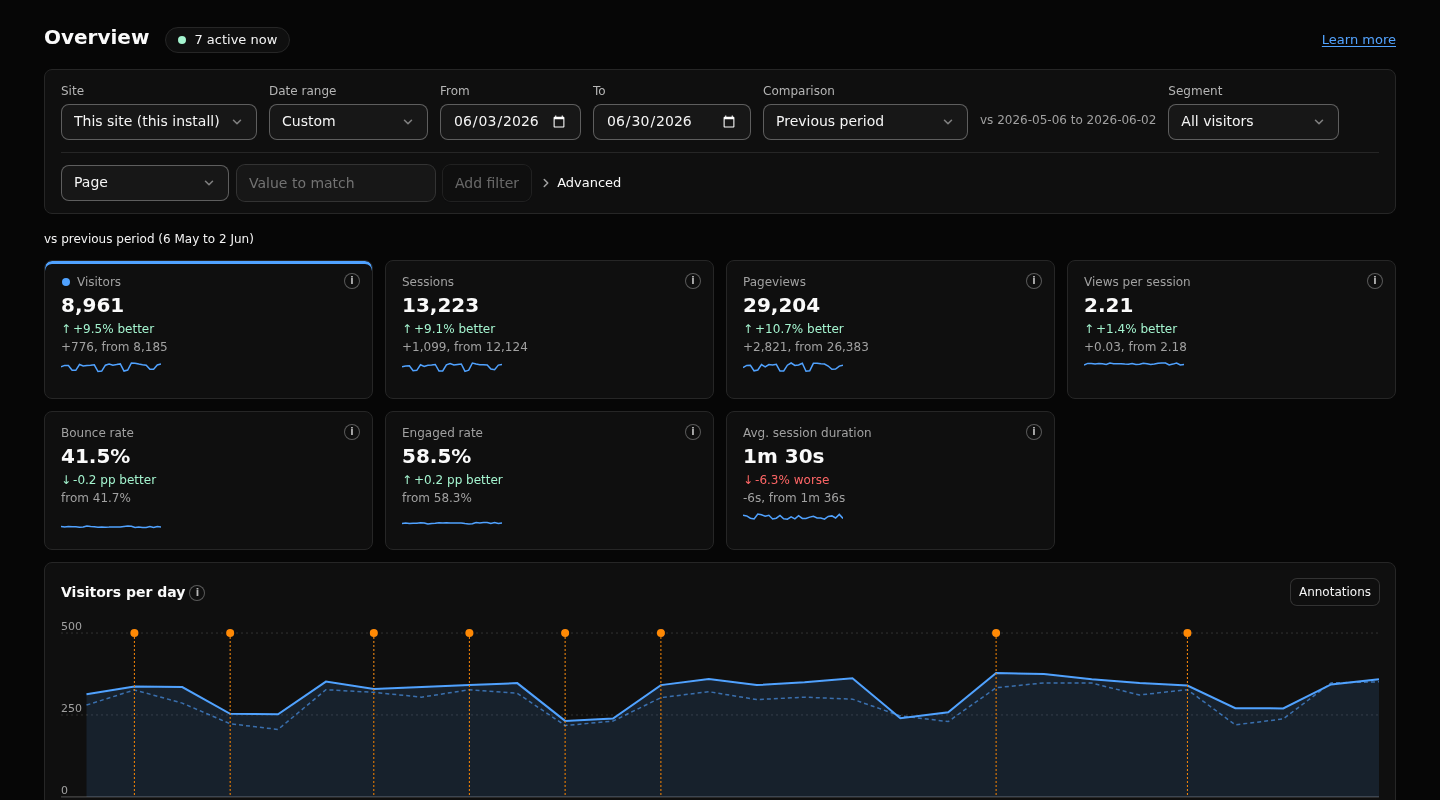
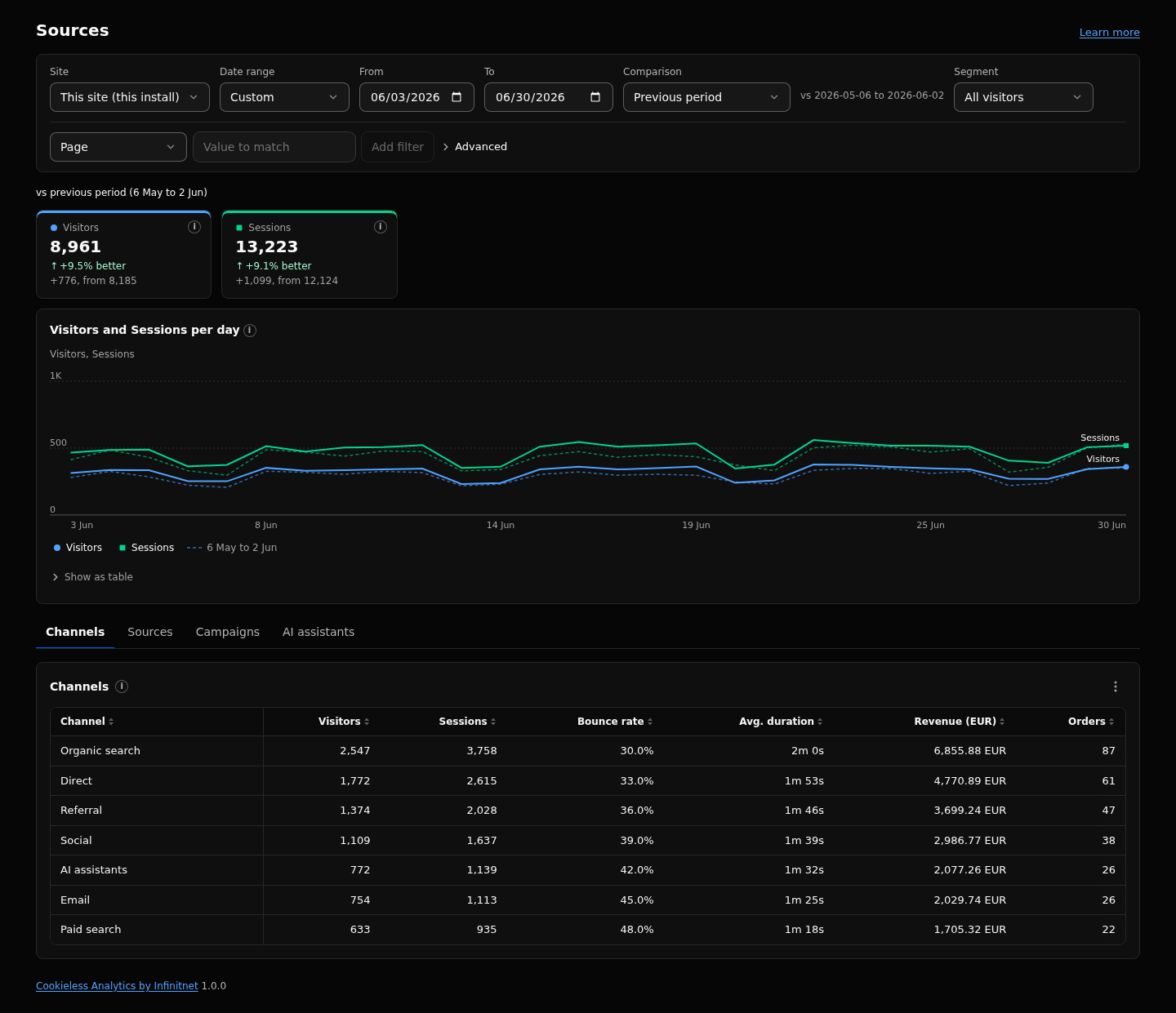
- Reports: Overview, Pages, Sources, Audience and Behaviour, with filters, saved segments and comparison with the previous period.
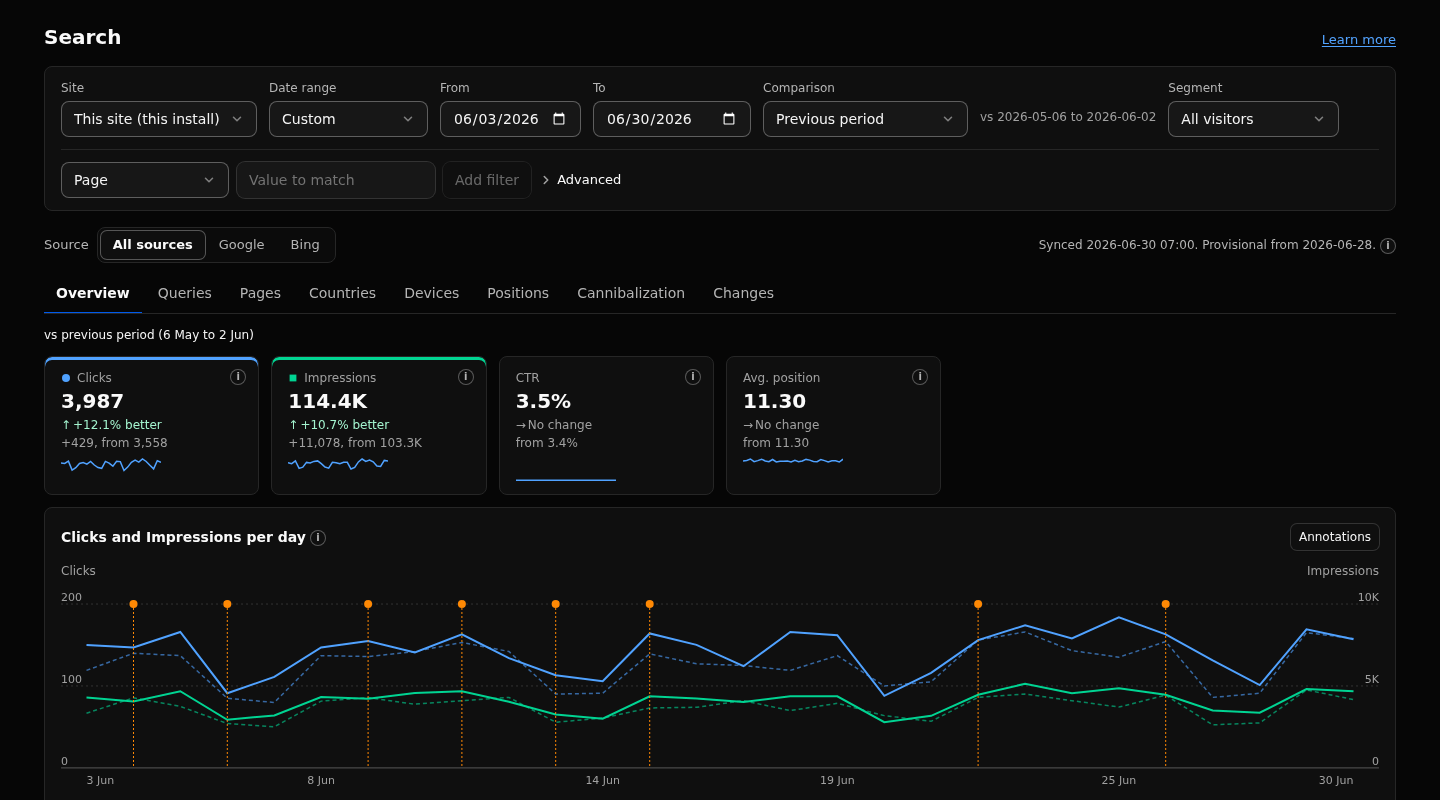
- Search data: Google Search Console and Bing clicks, impressions and positions next to your sessions, with SEO views for queries and pages.
- Search Satisfaction: an approximation of how a click-based system could rate your pages, from long clicks, short clicks and estimated pogo-sticking. These are estimates, and they're labeled as estimates.
- Goals, funnels and revenue: orders by source, campaign and landing page, with refunds and net revenue.
- Annotations: mark a release or a publish and compare any metric before and after it.
- Shareable dashboards: a share link opens a read-only HTML page with no script and no cookie, optionally password protected. Dashboards can also go out by scheduled email.
- Agent API and MCP tools: scoped API keys, an OpenAPI description and MCP tools that stay off until an admin switches them on.
Where Cookieless Analytics Stores Your Data
On your own Cloudflare account.
Pick one of three places:
- the EmDash D1 database
- a D1 database of its own
- Postgres through Hyperdrive
No third-party service. No telemetry. No browser call to anyone but your own site.
A page view sends one request, plus one engagement update when the tab is left.
Pages never wait for the analytics database.
On the Workers Free plan you pick the Small capacity profile, and a daily write guard keeps the CMS able to save content.
Measuring Sites That Aren't EmDash
Register the site under Definitions, then add one script tag or a Google Tag Manager tag.
It shows up in the same admin with its own site ID.
A plain Astro site, a static site or another CMS all work.
How to Install Cookieless Analytics on an Existing EmDash Site
You need EmDash 1.4 or later, Astro 7, Node 20 or newer to build, Cloudflare Workers with D1 and a Cron Trigger (* * * * *).
Step 1: Install the Package
npm install @infinitnet/cookieless-analyticsStep 2: Add the Plugin and the Integration
Both parts are needed. The integration goes in after emdash().
// astro.config.mjs
import { defineConfig } from "astro/config";
import emdash from "emdash/astro";
import cookielessAnalytics from "@infinitnet/cookieless-analytics";
import cookielessAnalyticsIntegration from "@infinitnet/cookieless-analytics/integration";

export default defineConfig({
  integrations: [
    emdash({
      // database, storage and the rest of your EmDash config
      plugins: [cookielessAnalytics()],
    }),
    cookielessAnalyticsIntegration(),
  ],
});
Step 3: Render EmDashHead, Add the Cron Trigger and Redeploy
Make sure your layout renders EmDashHead.
Add the Cron Trigger * * * * * to your Wrangler config. It rotates the salt, builds the daily summaries and applies retention.
Then redeploy.
The tables create themselves on first use, so there's no migration step to run.
View on GitHubInstall from npm
How to Deploy Cookieless Analytics as a New Site in One Click
The Deploy to Cloudflare button copies the template into a new repository on your GitHub or GitLab account and deploys it to your Cloudflare account.
Cloudflare creates the D1 database and the R2 bucket.
Then:
- Open
/_emdash/adminon the new site. - Finish the setup wizard.
- On Workers Free, set the capacity profile to Small.
What Cookieless Analytics Doesn't Do
No heatmaps.
No session replay.
No user profiles.
No cross-day returning visitors.
That's by design. If you need to follow individuals, this isn't the tool.
Why I Built Cookieless Analytics
I'm an SEO, and the cookieless plugin I used before was limited, especially at keeping referral and page navigation data.
I wanted real sessions without cookies.
I wanted Search Console next to them instead of in another tab.
And I wanted a metric that approximates what Navboost looks at.
That's Search Satisfaction: long clicks, short clicks, bad experiences and estimated pogo-sticking, calculated from your search visits.
It's an estimate, not Google's data, but it tells me which pages searchers leave unhappy.
So I built it.
This site runs on Cookieless Analytics itself, with no cookies and no storage.
Cookieless Analytics Source Code, npm Package and Docs
Questions or feedback?